
[ 9주차 - 1013 ]
    금일 커리큘럼
        ├ 09:00 ~ 12:00 backend 프로그래밍 (Spring Boot 개요, 프로젝트 생성 및 실행)
        └ 13:00 ~ 18:00 backend 프로그래밍 (Spring Boot 주요 어노테이션, IoC/DI 개념)
1. Spring Boot 개요
Spring과 Spring Boot란?
- Spring : 자바 플랫폼을 위한 오픈소스 애플리케이션 프레임워크
- 주요 특징으로는 IoC(제어의 역전), AOP(관점 지향 프로그래밍), 트랜잭션 관리 등을 제공하여, 엔터프라이즈급 애플리케이션 개발을 용이하게 함.
- Spring Boot : 스프링기반으로 WAS개발 간소화하고 빠르게 시작할 수 있도록 도와주는 프레임워크
- 복잡한 설정을 자동화하고, 내장 서버를 제공하여, 개발자가 빠르게 애플리케이션을 시작할 수 있도록 지원.
즉, 스프링은 핵심 모듈들 모아서 만든 것이고, 스프링 부트는 스프링을 더 쉽게 사용할 수 있도록 도와주는 도구
| 구분 | Spring | Spring Boot |
|---|---|---|
| 설정 방식 | 개발자가 직접 설정 파일 작성 필요 (XML, Java Config) |
자동 설정 제공 |
| 의존성 관리 | 필요한 라이브러리와 버전을 개발자가 직접 관리 | Starter 의존성으로 관련 라이브러리 자동 관리 |
| 서버 배포 | 별도의 WAS 설치 및 설정 필요 | 내장 서버 제공으로 독립 실행 가능 |
| 실행 파일 | WAR 파일로 패키징하여 서버에 배포 | 실행 가능한 JAR 파일 생성 |
| 개발 속도 | 초기 설정에 많은 시간 소요 | 빠른 프로젝트 시작 가능 |
| 사용 목적 | 세밀한 제어가 필요한 복잡한 애플리케이션 | 빠르고 간단한 애플리케이션 개발 |
Spring Boot의 핵심 가치
- CoC(Convention over Configuration) : 일반적인 설정을 미리 정의하여, 개발자가 최소한의 설정으로도 애플리케이션을 시작할 수 있도록 함.
- 자동 설정(Auto Configuration) : 개발자가 직접 설정 파일을 작성하지 않아도, Spring Boot가 프로젝트의 의존성에 따라 자동으로 필요한 설정을 적용.
- 독립 실행형 애플리케이션 : 내장서버 (예: Tomcat, Jetty)를 포함하여, 별도의 서버 설치 없이도 애플리케이션을 실행할 수 있음.
- 운영 환경 최적화 : Spring Boot는 운영 환경에서의 성능과 안정성을 고려하여 설계되었으며, 다양한 모니터링 및 관리 기능을 제공.
2. Spring Boot 프로젝트 시작하기
Spring Initializr를 이용한 프로젝트 생성
Spring Initializr : Spring Boot 프로젝트를 쉽게 생성할 수 있는 웹 기반 도구
- 해당 URL 접속 : https://start.spring.io/
- 혹은 IntelliJ 울티메이트에서 New Project -> Spring Initializr 선택
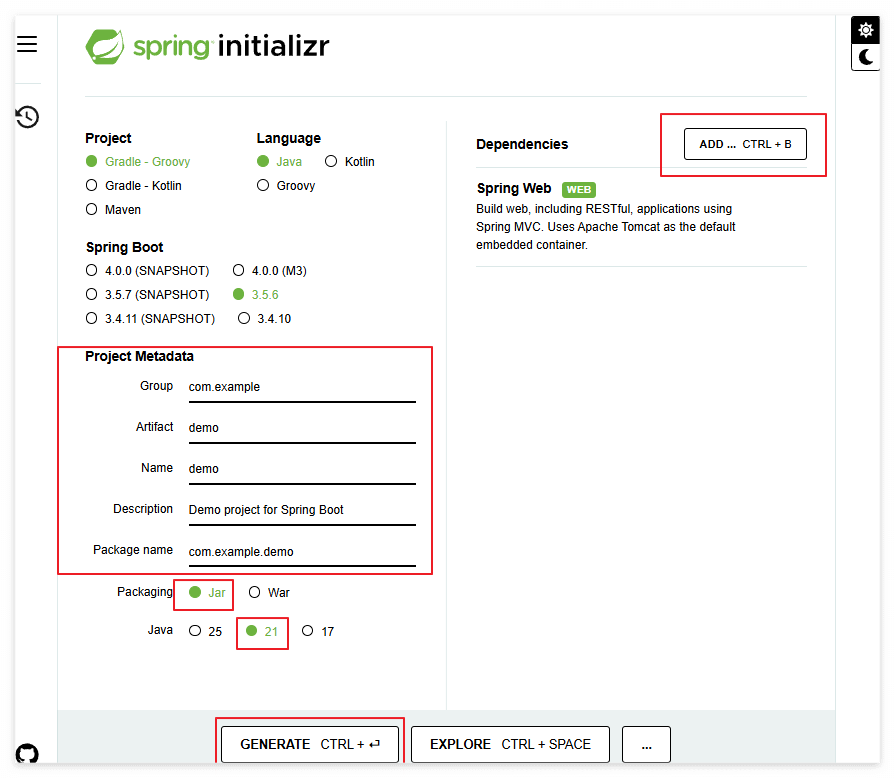
프로젝트 메타데이터
- Project : gradle - Groovy
- Language : Java
- Spring Boot : 3.5.6
- Project Metadata
- Group : com.example (회사 도메인 역순)
- Artifact : demo (프로젝트 이름)
- Name : demo (프로젝트 이름)
- Description : Demo project for Spring Boot (프로젝트 설명)
- Package name : com.example.demo (기본 패키지 이름)
- Packaging : Jar (실행 가능한 JAR 파일 생성)
- Java : 21 (사용할 Java 버전)
Dependencies (의존성)
- Spring Web : 웹 애플리케이션 개발을 위한 기본 의존성
- Spring Boot DevTools : 개발 편의를 위한 도구 (자동 재시작, 라이브 리로드 등)
설정 완료 후 제너레이트 클릭하여 해당 프로젝트 다운로드 (zip 파일)
IntelliJ를 이용한 프로젝트 생성

- 메타데이터 입력 후 -> [다음] -> 필요한 Dependencies 선택 -> [완료] 클릭
IntelliJ에서 Spring Boot 프로젝트 열기
- File -> Open -> 해당 폴더 선택
- 외부 라이브러리 다운로드 및 인덱싱 진행 (잠시 대기)
- Gradle 프로젝트이므로, IntelliJ가 자동으로
build.gradle파일을 인식하고 필요한 라이브러리를 다운로드하게 됨. - external Libraries에 그래들
Spring Boot,Spring Web등이 추가된 것을 확인할 수 있음.
- Gradle 프로젝트이므로, IntelliJ가 자동으로
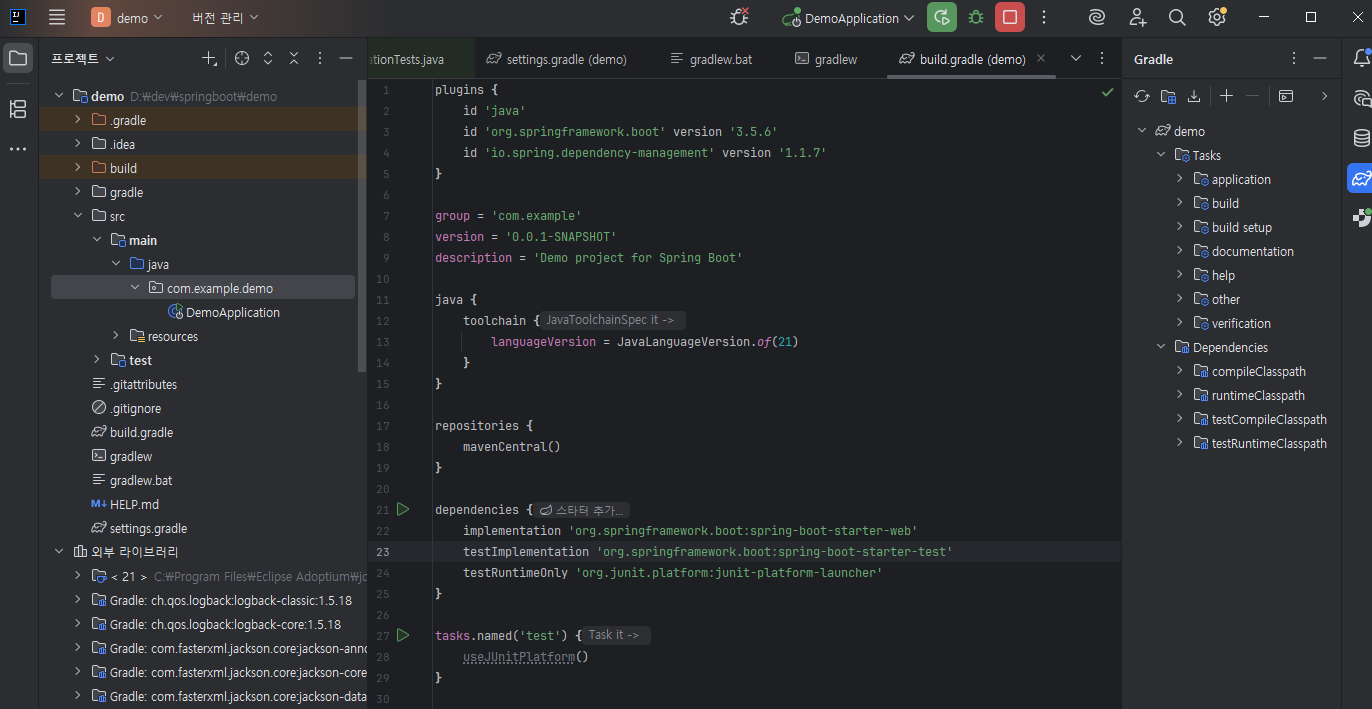
스프링 부트 구조
demo
 ├─ .idea
 ├─ src
 │   ├─ main
 │   │   ├─ java/com/example/demo       # 기본 패키지 경로
 │   │   │   └─ DemoApplication.java    # 메인 애플리케이션 클래스
 │   │   │
 │   │   └─ resources                   # 리소스 파일 경로
 │   │       ├─ static                   # 정적 자원 (CSS, JS, 이미지 등)
 │   │       ├─ templates                # 템플릿 파일 (Thymeleaf 등)
 │   │       ├─ application.properties   # 애플리케이션 설정 파일
 │   │       └─ ...
 │   │
 │   └─ test # 테스트 소스 경로
 │       └─ java/com/example/demo
 │           └─ DemoApplicationTests.java
 ├─ .gitignore
 ├─ build.gradle    # 그래들 빌드 설정 파일
 ├─ gradle          # 그래들 래퍼 파일
 ├─ gradlew         # 그래들 래퍼 실행 파일
 ├─ gradlew.bat     # 그래들 래퍼 배치 파일
 └─ settings.gradle # 그래들 설정 파일
3. Spring Boot 애플리케이션 실행하기
DemoApplication.java
- 해당 자바 파일이 스프링 부트 애플리케이션의 진입점
@SpringBootApplication어노테이션이 붙어있으며,main메서드에서SpringApplication.run()메서드를 호출하여 애플리케이션을 시작되도록 함@GetMapping어노테이션을 사용하여 HTTP GET 요청을 처리하는 메서드를 정의할 수 있음
// ...
import org.springframework.boot.SpringApplication;
import org.springframework.boot.autoconfigure.SpringBootApplication;
import org.springframework.web.bind.annotation.GetMapping;
import org.springframework.web.bind.annotation.RestController;

@SpringBootApplication  // 스프링 부트 애플리케이션임을 나타내는 어노테이션
@RestController         // RESTful 웹 서비스의 컨트롤러 역할을 하는 클래스임을 나타냄
public class HellospringApplication {

    // HTTP GET 요청을 처리하는 메서드 매핑
    @GetMapping("/star1431") // localhost:8080/star1431 접속하면 나타남
    public String star1431() {
        return "Hello Spring Boot!";
    }

    public static void main(String[] args) {
        SpringApplication.run(HellospringApplication.class, args);
    }
}
로컬포트 변경 방법
- 기본적으로 스프링 부트 애플리케이션은 8080 포트를 사용
src/main/resources/application.properties파일에 다음 설정 추가
# 서버 포트 설정 (기본값: 8080)
server.port=8088

# 개발 환경에서 자동 재시작 활성화
spring.devtools.restart.enabled=trueapplication.yml파일로도 설정 가능
server:
  port: 8088
4. build.gradle 상세 분석
Spring Boot 3.x의 build.gradle은 다음과 같은 주요 섹션으로 구성됨
plugins { // 플러그인 섹션
    id 'java'
    id 'org.springframework.boot' version '3.5.6'
    id 'io.spring.dependency-management' version '1.1.7'
}

// 프로젝트 메타데이터
group = 'com.example'
version = '0.0.1-SNAPSHOT'
description = 'Demo project for Spring Boot'

java { // 자바 섹션 (컴파일러)
    toolchain { // 자바 툴체인 설정
        languageVersion = JavaLanguageVersion.of(21) // 자바 21 버전 사용
    }
}

repositories { // 의존성 저장소 섹션
    mavenCentral()
}

dependencies { // 의존성 섹션
    implementation 'org.springframework.boot:spring-boot-starter-web' // starter-web : 웹 개발용
    // implementation 'org.springframework.boot:spring-boot-devtools' // 개발 편의를 위한 도구
    testImplementation 'org.springframework.boot:spring-boot-starter-test' // stater-test : 테스트용
    testRuntimeOnly 'org.junit.platform:junit-platform-launcher'
}

tasks.named('test') { // 테스트 태스크 설정
    useJUnitPlatform()
}- plugins : 프로젝트에 적용할 플러그인 정의
java: 자바 프로젝트용 플러그인org.springframework.boot: 스프링 부트 플러그인io.spring.dependency-management: 의존성 관리 플러그인
- dependencies : 프로젝트에 필요한 라이브러리 의존성 정의
implementation: 컴파일 및 런타임에 필요한 의존성 (Spring Boot Starter 등)testImplementation: 테스트 코드 컴파일 및 런타임에 필요한 의존성 (JUnit, Mockito 등)testRuntimeOnly: 테스트 실행 시에만 필요한 의존성 (JUnit 플랫폼 런처 등)runtimeOnly: 런타임에만 필요한 의존성 (예: JDBC 드라이버)compileOnly: 컴파일 시에만 필요한 의존성 (예: Lombok)
dependencies {
    implementation 'org.springframework.boot:spring-boot-starter-web' // 웹 개발용
    implementation 'org.springframework.boot:spring-boot-starter-data-jpa' // JPA 사용용
    implementation 'com.h2database:h2' // H2 데이터베이스
    testImplementation 'org.springframework.boot:spring-boot-starter-test' // 테스트용
}
TIP - 터미널 그래들 명령어 모음
# 애플리케이션 실행 (개발 모드)
./gradlew bootRun

# 전체 빌드 (컴파일 + 테스트 + JAR 생성)
./gradlew build

# 테스트 실행
./gradlew test

# 실행 가능한 JAR 파일 생성
./gradlew bootJar

# 빌드 결과물 삭제 (clean build 시 유용)
./gradlew clean

# clean + build 한 번에 실행
./gradlew clean build

# 의존성 트리 확인
./gradlew dependencies

# 프로젝트 정보 확인
./gradlew projects

# 사용 가능한 모든 Task 확인
./gradlew tasks

# 특정 Task 상세 정보
./gradlew help --task bootRun

# 테스트 스킵하고 빌드
./gradlew build -x test

# 병렬 빌드 (멀티 모듈 프로젝트)
./gradlew build --parallel

# 빌드 캐시 사용
./gradlew build --build-cache

# 의존성 새로 다운로드 (캐시 무시)
./gradlew build --refresh-dependencies

# 디버그 모드로 실행
./gradlew bootRun --debug-jvm
5. 스트링부트 어노테이션 이해
주요 어노테이션
@SpringBootApplication: 스프링 부트 애플리케이션의 시작점임을 나타냄- 딱 한 개의 클래스에만 붙여야 함 (보통 메인 클래스)
- 내부적으로
@Configuration,@EnableAutoConfiguration,@ComponentScan을 포함되어 있음. - 컴포넌트스캔 ? 메인에서 객체 생성 안하고도 자동으로 스캔하여 Bean으로 등록 (DI 가능)
@RestController: RESTful 웹 서비스의 컨트롤러 역할을 하는 클래스임을 나타냄@Controller와@ResponseBody가 결합된 형태- 메서드가 반환하는 값이 HTTP 응답 본문에 직접 쓰여짐 (뷰 리졸버 사용 안함)
@GetMapping: HTTP GET 요청을 처리하는 메서드를 매핑@RequestMapping(method = RequestMethod.GET)의 축약형- 예:
@GetMapping("/hello")
@SpringBootApplication
@RestController
public class DemoApplication {
    public static void main(String[] args) {
        SpringApplication.run(DemoApplication.class, args);
    }
}
//order source...
@RestController  // 스프링부트어플리케이션에서 컴포넌트 스캔에 탐지되어 "/json01" 접속됨
class TestController {
    @GetMapping("/json01")
    public Map<String, Object> json01() {
        Map<String, Object> map = new HashMap<>();
        map.put("key01", "value01");
        map.put("key02", 1);
        map.put("time", LocalDateTime.now().toString());
        return map;
    }
}
6. 스프링 코어 - IoC / DI
IoC (Inversion of Control, 제어의 역전)
- 객체의 생성과 생명주기 관리를 개발자가 아닌 프레임워크가 담당
- 객체의 의존성을 외부에서 주입받아 사용 (DI)
DI (Dependency Injection, 의존성 주입)
- 객체가 필요로 하는 의존 객체를 외부에서 주입받는 방식
- 생성자 주입, 세터 주입, 필드 주입 방식이 있음
- 스프링에서는 주로 생성자 주입을 권장 (불변성 유지, 테스트 용이)
스프링 Bean
- 빈은 인스턴스화된 객체를 의미하며, 스프링 IoC 컨테이너에 등록된 객체를 스프링 빈이라고 함.
- 즉, 자바의 new 키워드로 생성한 객체 대신 스프링이 관리하는 객체를 사용
Bean 등록 방법
@Component,@Service,@Repository,@Controller등 사용하여 등록@Configuration클래스 내에서@Bean사용하여 등록- XML 설정 파일을 통해 등록 (구식 방법)
import org.springframework.context.ApplicationContext;
import org.springframework.context.annotation.AnnotationConfigApplicationContext;
import org.springframework.stereotype.Component;

// 0. Component 사용한 Bean 등록 (일반 컴포넌트)
@Component
class MyComponent {
    public void message() {
        System.out.println("안녕하세요 Component 정상 등록되었습니다!");
    }
}

public class ComponentExample {
    public static void main(String[] args) {
        // ApplicationContext context = new AnnotationConfigApplicationContext(MyComponent.class);
        // 현재 클래스가 속한 패키지를 기준으로 컴포넌트 스캔
        ApplicationContext context =
                new AnnotationConfigApplicationContext(ComponentExample.class.getPackageName());


        // 등록된 Bean 가져오기
        MyComponent myComponent = context.getBean(MyComponent.class);
        myComponent.message(); // "안녕하세요 Component 정상 등록되었습니다!" 출력

        context.close();
    }
}
import org.springframework.web.bind.annotation.Service;
// 1. @Service를 사용한 Bean 등록 (비즈니스 로직 담당)
@Service
public class UserService {
private final UserRepository userRepository;
// 생성자 주입 (권장 방식)
public UserService(UserRepository userRepository) {
this.userRepository = userRepository;
}
public User findUserById(Long id) {
return userRepository.findById(id);
}
public User createUser(String name, String email) {
User newUser = new User(name, email);
return userRepository.save(newUser);
}
}import org.springframework.web.bind.annotation.Repository;
// 2. @Repository를 사용한 Bean 등록 (데이터 액세스 담당)
@Repository
public class UserRepository {
private final List<User> users = new ArrayList<>();
public User findById(Long id) {
return users.stream()
.filter(user -> user.getId().equals(id))
.findFirst()
.orElse(null);
}
public User save(User user) {
users.add(user);
return user;
}
}import org.springframework.web.bind.annotation.RestController;
import org.springframework.web.bind.annotation.GetMapping;
// 3. @Controller를 사용한 Bean 등록 (웹 요청 처리 담당)
@RestController
public class UserController {
private final UserService userService;
// 생성자 주입으로 UserService 의존성 주입
public UserController(UserService userService) {
this.userService = userService;
}
@GetMapping("/users/{id}")
public User getUser(@PathVariable Long id) {
return userService.findUserById(id);
}
@PostMapping("/users")
public User createUser(@RequestBody CreateUserRequest request) {
return userService.createUser(request.getName(), request.getEmail());
}
}import org.springframework.context.annotation.Configuration;
import org.springframework.context.annotation.Bean;
// 4. @Configuration과 @Bean을 사용한 Bean 등록
@Configuration
public class AppConfig {
// 애플리케이션 설정 Bean
@Bean
public AppProperties appProperties() {
AppProperties properties = new AppProperties();
properties.setName("Spring Boot Demo");
properties.setVersion("1.0.0");
return properties;
}
}
// 설정 클래스 예시
class AppProperties {
private String name;
private String version;
public String getName() { return name; }
public void setName(String name) { this.name = name; }
public String getVersion() { return version; }
public void setVersion(String version) { this.version = version; }
}7. Bean 관리 실습
IoC 방식
스프링 컨테이너가 객체의 생성과 생명주기를 관리하는 방식
- context.getBean("빈이름", 클래스명.class) 으로 주입
- @Scope("prototype") : 매번 새로운 인스턴스 생성 (기본값은 싱글톤)
package sample.bean;

public class MyBean {
    private String name;
    private int age;

    public MyBean() {
        System.out.println("마이빈 생성!");
    }

    public MyBean(String name, int age) {
        this.name = name;
        this.age = age;
    }

    public String getName() { return name; }
    public void setName(String name) { this.name = name;}
    public int getAge() { return age; }
    public void setAge(int age) { this.age = age; }

    @Override
    public String toString() {
        return "MyBean{" +
                "name='" + name + '\'' +
                ", age=" + age +
                '}';
    }
}
package sample.config;
import org.springframework.context.annotation.Bean;
import org.springframework.context.annotation.Configuration;
import org.springframework.context.annotation.Scope;
import sample.bean.MyBean;
@Configuration
public class MyBeanConfig {
// XML
// <bean id="myBean" class="sample.bean.MyBean"/>
@Bean
public MyBean myBean() { return new MyBean(); }
@Bean
@Scope("prototype") // 프로토타입 스코프 설정
public MyBean myBean1() { return new MyBean(); }
@Bean
public MyBean myBean2() { return new MyBean(); }
@Bean
public MyBean myBean3() {
MyBean myBean = new MyBean();
myBean.setName("myBean3");
myBean.setAge(88);
return myBean;
}
}package sample.run;
import org.springframework.context.ApplicationContext;
import org.springframework.context.annotation.AnnotationConfigApplicationContext;
import sample.bean.MyBean;
import sample.config.MyBeanConfig;
public class RunExam01 {
public static void main(String[] args) {
System.out.println("스프링 빈 등록 전 ----");
ApplicationContext context = new AnnotationConfigApplicationContext(MyBeanConfig.class);
System.out.println("스프링 빈 등록 후 ----");
// 등록된 빈
MyBean bean = (MyBean) context.getBean("myBean");
bean.setName("star1431");
bean.setAge(99);
System.out.println(bean.toString());
MyBean myBean = (MyBean) context.getBean("myBean");
System.out.println(bean == myBean); // true (@Scope 아닌 경우 같은 인스턴스)
// 타입을 통해서 주입
MyBean bean1 = context.getBean("myBean1", MyBean.class); // @Scope
bean1.setName("star1431");
bean1.setAge(88);
System.out.println(bean1.toString());
MyBean bean2 = context.getBean("myBean2", MyBean.class); // 다른 네임
System.out.println(bean2.toString());
MyBean bean3 = context.getBean("myBean3", MyBean.class); // 컨피그에서 값 세팅
System.out.println(bean3.toString());
}
}# 실행 결과
스프링 빈 등록 전 ----
마이빈 생성!
마이빈 생성!
마이빈 생성!
스프링 빈 등록 후 ----
MyBean{name='star1431', age=99}
true
마이빈 생성!
MyBean{name='star1431', age=88}
MyBean{name='null', age=0}
MyBean{name='myBean3', age=88}DI 방식
의존성 주입하여 객체를 사용하는 방식
- 생성자 주입, 세터 주입 방식이 있음 (하단 예시 Dice.java)
- 생성자 주입 : 불변성 유지, 필수 의존성 주입에 적합
- 세터 주입 : 선택적 의존성 주입에 적합
package sample.bean;

public class Dice {
    private int face;

    public Dice() { System.out.println("Dice() 생성!"); }

    public Dice(int face) {
        this.face = face;
        System.out.println("Dice(int) 생성!");
    }

    public int getFace() { return face; }
    public int runDice() { return (int) (Math.random() * face) + 1; }
}
package sample.bean;
public class Player {
private String name;
private Dice dice; // 의존성 주입 받음 (DI)
public Player() {}
// 생성자로 주입
public Player(Dice dice) { this.dice = dice; }
public void setName(String name) { this.name = name; }
// 세터로 주입
public void setDice(Dice dice) { this.dice = dice; }
public void play() {
System.out.printf("[%s]님이 주사위 던져서 [%d] 나왔습니다. (주사위면: %d)%n", name, dice.runDice(), dice.getFace());
}
}package sample.bean;
import java.util.List;
public class Game {
private List<Player> players; // 의존성 주입
public Game() {}
// 생성자로 주입 전달
public Game(List<Player> players) { this.players = players; }
public void play() {
for (Player player : players) {
player.play();
}
}
}package sample.config;
import org.springframework.context.annotation.Bean;
import sample.bean.Dice;
import sample.bean.Game;
import sample.bean.Player;
import java.util.List;
public class GameConfig {
@Bean
public Dice dice() {
return new Dice(6);
}
@Bean
public Player kim(Dice dice) {
Player player = new Player(dice);
player.setName("kim");
return player;
}
@Bean
public Player player1(Dice dice) {
Player player = new Player(dice);
player.setName("player1");
return player;
}
@Bean
public Player player2(Dice dice) {
Player player = new Player(dice);
player.setName("player2");
return player;
}
@Bean
public Game game(List<Player> players) {
return new Game(players);
}
}package sample.run;
import org.springframework.context.ApplicationContext;
import org.springframework.context.annotation.AnnotationConfigApplicationContext;
import sample.bean.Game;
import sample.bean.Player;
import sample.config.GameConfig;
public class RunExam02 {
public static void main(String[] args) {
ApplicationContext context = new AnnotationConfigApplicationContext(GameConfig.class);
Player kim = context.getBean("kim", Player.class);
kim.play();
System.out.println("Bean 등록된 플레이어들 ---");
Game game = context.getBean("game", Game.class);
game.play();
}
}# 실행 결과
Dice(int) 생성!
[kim]님이 주사위 던져서 [4] 나왔습니다. (주사위면: 6)
Bean 등록된 플레이어들 ---
[kim]님이 주사위 던져서 [1] 나왔습니다. (주사위면: 6)
[player1]님이 주사위 던져서 [3] 나왔습니다. (주사위면: 6)
[player2]님이 주사위 던져서 [5] 나왔습니다. (주사위면: 6)etc.
포트 강제 종료 방법 (cmd)
Windows
# 포트 사용 프로세스 찾기
netstat -ano | findstr :8080

# 실행결과
# TCP   0.0.0.0:8080  0.0.0.0:0   LISTENING   1160
# TCP   [::]:8080     [::]:0      LISTENING   1160

# 프로세스 종료 (LISTENING 옆에 있는 PID 번호 입력)
taskkill /PID [PID번호] /F
Mac / Linux
# 포트 사용 프로세스 찾기
lsof -i :8080

# 프로세스 종료
kill -9 [PID번호]